Your CRM platform just got even better. Capsule CRM isn’t just for managing your sales, contacts, and projects: now, you can manage and achieve your KPIs here, too. With Goals, you can set and track targets for you and your team in the same place you get work done.
And now, we’ve expanded Goals even further.
With the addition of Activity and Task Goals, you can track not just outcomes, but the daily work that drives them, helping you build stronger habits, improve visibility, and get more value from your CRM. Let’s dig in.
What are Goals in Capsule?
Goals are exactly what it says on the tin: a new feature enabling you to set and meet your business objectives while tracking your performance. All from the comfort of your CRM.

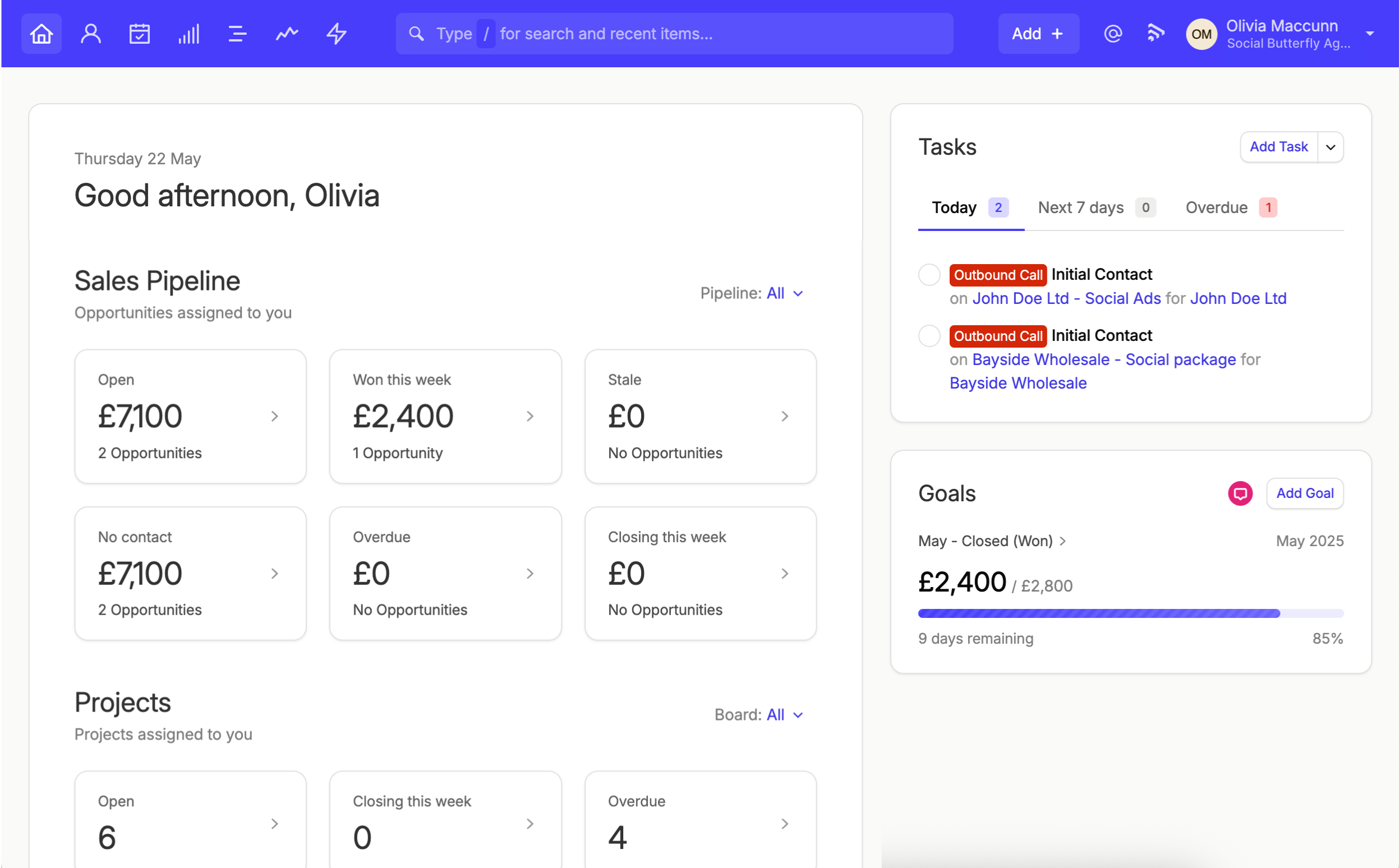
You’ll find your Goals in your homepage summary or within the Reports area, where you can check progress at a glance, dive deeper into performance over time, and track results across individuals or your entire team.
And now, you can create goals across three key areas:
- Opportunities: track revenue, deals created, or pipeline milestones
- Activities: track actions like calls, meetings, and notes
- Tasks: track completed tasks, including specific categories.
Whether you’re aiming to earn a specified value or achieve a target number of activities, the Goals tool makes it easy. You can even set the duration and frequency of the goal. Not only can you visualize your wins, but you can track the work that leads to them, too.
First, let’s explore what’s so good about setting and tracking your goals in Capsule.
What are the benefits of using Goals in Capsule?
Goals in Capsule CRM have always been designed to give you greater visibility, accountability, and motivation, all within the same platform you use every day.
With the latest addition of Activity and Task Goals, those benefits go even further.
Greater visibility over performance
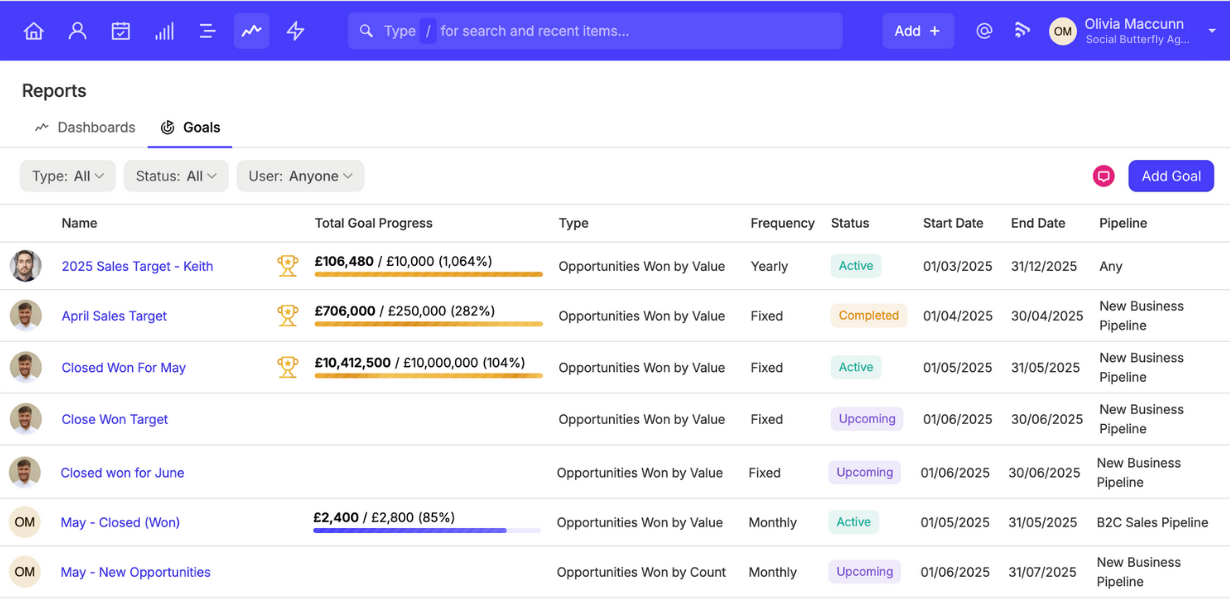
Goal progression is displayed front and center in Capsule CRM, so you can always see how you or your team are performing against targets.
Now, instead of only seeing end results, you can also track:
- The number of calls made
- How many meetings were logged
- The volume of Tasks completed.
Not only do you have a better view of daily or weekly output, but you can also get a clearer understanding of how many touchpoints are necessary to make a sale.
Create accountability without the admin
Managers often rely on spreadsheets or constant check-ins to track activity. Instead of the endless pursuit of the exact file you need and the mind-numbing to-and-fros of tab-hopping, you can just navigate to your Activity and Task Goals in Capsule CRM.
Simplify your managerial work; create accountability. Use Capsule’s Goals to:
- Set goals for each team member
- ... or delegate goal ownership to your team to help them develop their skills for career development
- Track progress week by week, so you can instantly see who’s on track and who might need support
And since it all lives in your CRM, there’s no need to chase updates or manage separate tools. Sweet relief. It’s the same kind of ‘ahhh’ you get from a good cup of tea…
Boost motivation with real-time progress
Keeping goals visible helps teams stay focused and motivated. With Activity and Task Goals, that motivation becomes more immediate and tangible:
- Real-time progress shows how close you are to your target
- Visual rewards like gold trophies celebrate achievements
- Clear daily targets give reps something concrete to aim for
It’s a bit like tracking your daily steps; once you can see your progress, it’s more satisfying to hit your targets and easier to stay on track.
Turn daily effort into long-term results
Traditional sales goals focus on outcomes like revenue, deals won, and pipeline progression. But reaching those outcomes takes consistent daily activity. So, how do you motivate someone to find their rhythm and stay persistent?
You can use Activity and Task Goals to remind yourself and your team that what seems like small, everyday work is actually moving the needle. The latest goal types help bridge that gap by letting you:
- Track the “inputs” that lead to success
- Set targets for calls, follow-ups, and key tasks
- Break larger goals into manageable weekly or monthly progress
In the long term, it helps teams build the habits that lead to better results.
We spoke to Jade Say, Product Manager at Capsule CRM, to better understand how the latest updates to Goals will help real Capsule customers:


Build a more reliable source of truth
The more consistently your team logs activities and completes tasks in Capsule, the more accurate your CRM becomes. By incentivizing activity tracking, Goals help:
- Improve your data quality
- Strengthen your reporting
- Support better decision-making
It’s not just about hitting targets; it’s about making your CRM a more reliable source of truth for your business.
Connects to live Opportunities for hands-free updates
Managing your Goals in-app makes it easy to find the contact records and Opportunities they relate to. No more digging around!
But that’s not all. These benefits lead to greater wins for your business in the long term.
- Close more deals: Motivated by your current progress and what you need to achieve to meet your goals, your team is energized to nurture more leads and close more deals.
- Make smarter business decisions: As a team leader, reviewing goal performance can help you better understand your team and their strengths and weaknesses. Use this to restructure their responsibilities and capitalize on their differing skill sets.
- Set smarter goals: If your team consistently underperforms, it may be that your goals are over-ambitious, or aren’t realistic and achievable. Use Goals to review performance and to help you set SMART goals.
- More realistic forecasting: Use present and historical performance data to forecast future activities and resulting new revenue more accurately.
The Goals tool is an asset to your daily work and long-term business decisions. Below, you can see what that looks like for tracking Sales Goals and Activity Goals, respectively.

What kind of goals can I set?
You can use Goals to track the progress of various aims and activities, measuring the monetary value or counting activities.
Opportunity-based goals
Set goals for yourself or team members around the Opportunities in Capsule CRM. For instance, you can set up goals targeting:
- Opportunities created (by value or count)
- Opportunities won (by value or count)
- Opportunities progressed to milestone*
*Available from the Growth plan.
Activity-based goals
If you know a certain activity type (like phone calls) helps progress or close opportunities, why not set goals against a number of phone calls?
- Activity-based goals are count-based, measuring the number of activities logged (calls, meetings, notes, or custom activity types)
- Targets can be set for a specific activity type or all activities
Task-based goals
Or you can create Goals to complete tasks in specific categories like ‘contract renewals’ or ‘high priority tasks’.
- Target the number of tasks completed
- Goals can focus on all tasks or specific categories
This flexibility allows you to track both outcomes and the behaviors that drive them, giving you a more complete view of performance.

How do I set Goals in Capsule?
You can create Goals in multiple ways:
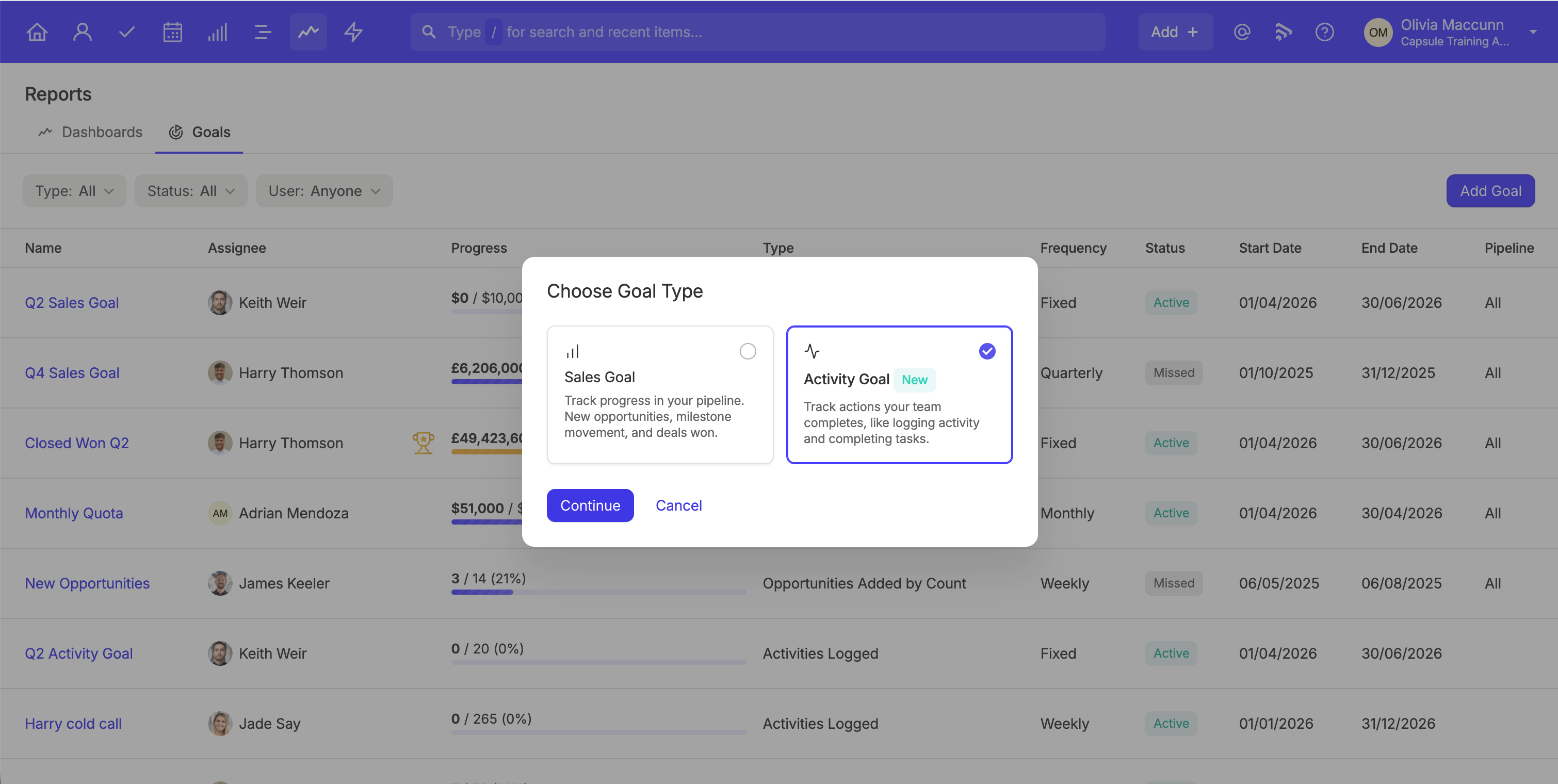
- From your home page summary, find the Goals summary box in the right-hand panel and select 'Add Goal'.
- Head to Reports in the navigation bar and select Goals (next to Dashboards). In the top right is a button to 'Add Goal'.
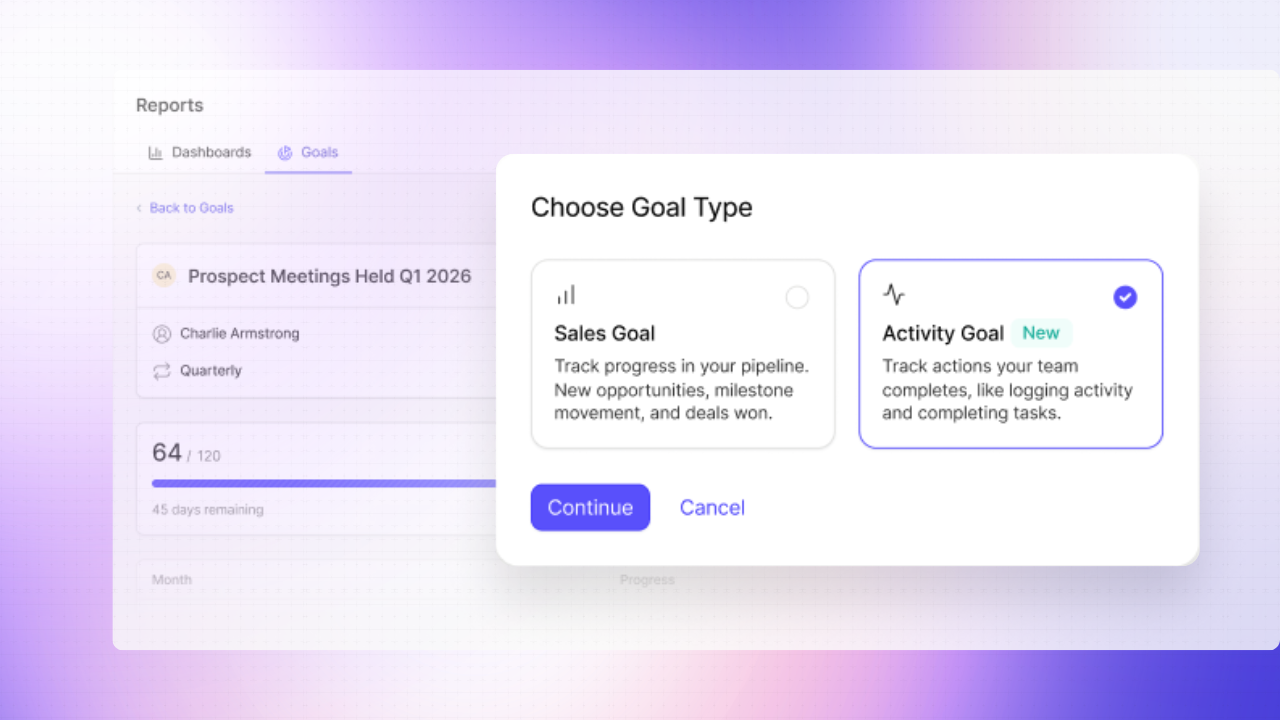
Following either route, you'll now see a small pop-up box where you'll first be asked to select between a Sales Goal or an Activity Goal type. Once you've made your choice, you can configure your goal. The options vary by goal type, so we'll split out what's available in either case.
Configuring your Sales Goal in Capsule CRM
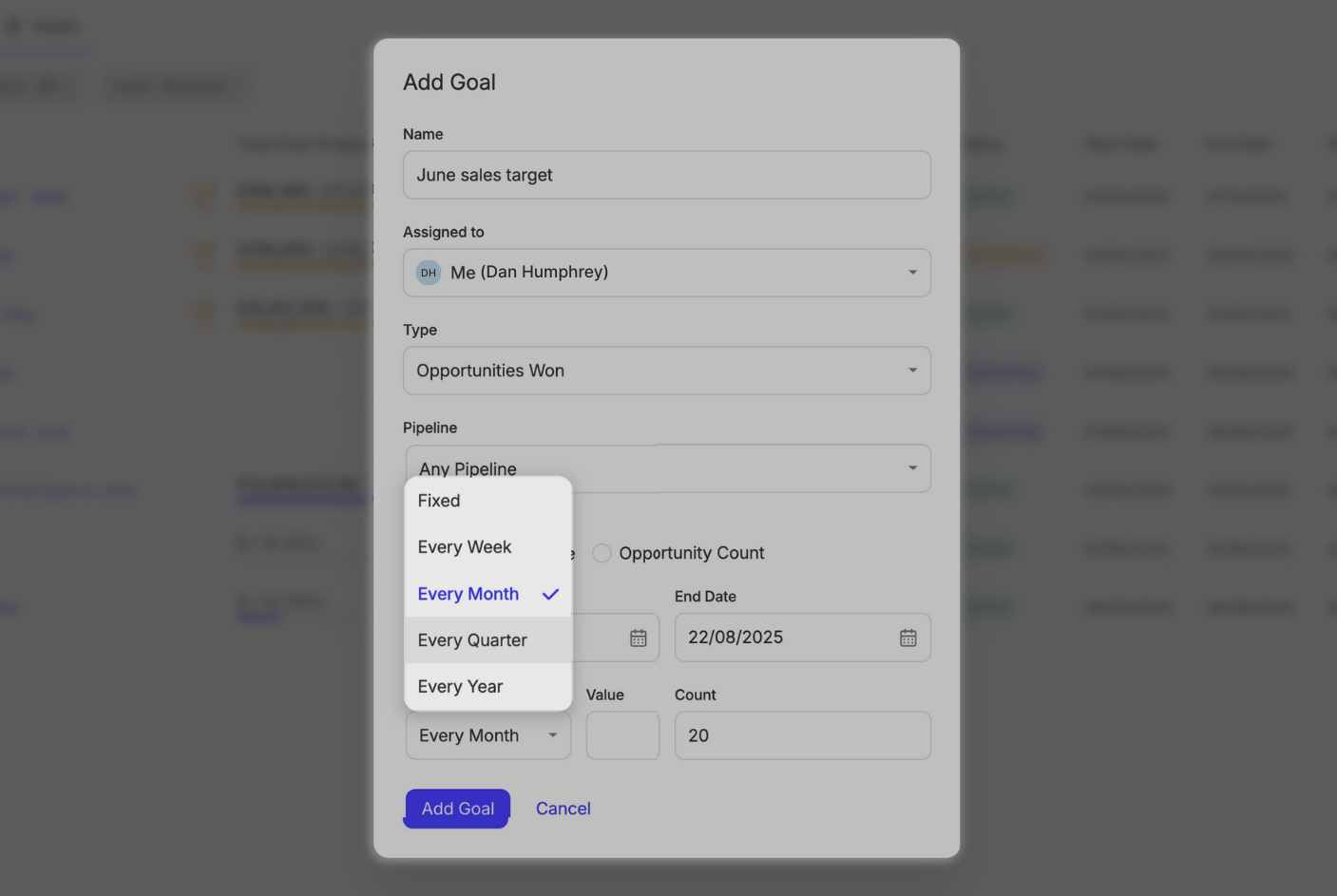
You'll see the following fields to specify your Sales Goal:
- Who it's assigned to
- The type of Goal (e.g. Opportunities won)
- The pipeline your Goal relates to
- Whether the Goal is to achieve a specified value (e.g. $5000) or a count (e.g. 10 Opportunities)
- The date range
- The frequency of the Goal. You can choose a one-off Goal(fixed) or a recurring Goal (Weekly, monthly, quarterly, or annually).

Configuring your Activity Goal in Capsule CRM
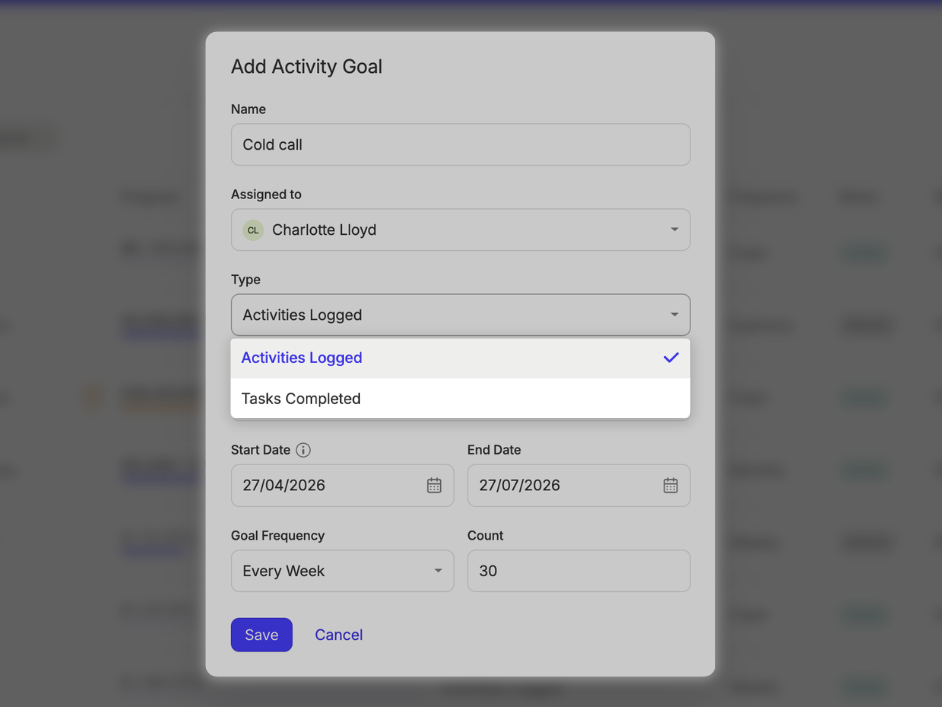
Setting an Activity or Task Goal? Here are the parameters you can set each time:
- Who it's assigned to
- The type of Goal (e.g. Activities logged, Tasks completed)
- Activity type (e.g. Cold call, email, custom activity)
- Task Category (e.g. Contract renewal, onsite service)
- A start and end date
- The frequency of the Goal. You can choose a one-off Goal(fixed) or a recurring Goal (Weekly, monthly, quarterly, or annually).
- And the target itself!

Reach your goals (and then some) with Capsule
Whether you’re a small business owner, department head, or team member, Goals helps you keep on top of revenue and company growth objectives, stay motivated, and create accountability. Start setting Goals in Capsule CRM today to close more deals, get more done, and make smarter business decisions.
Sign up to Capsule today to build powerful relationships, close more deals, and deliver more projects in an easy-to-use CRM.