
If you run a sales team and want to eliminate busywork while focusing on the actual selling, Folk CRM may be on your radar. Built with small businesses in mind, Folk has a lot going for it. Easy contact management combined with AI features and agents, and a good entry price point make Folk interesting as a first CRM.
But once you're past the onboarding stage, cracks start showing: from the lack of a mobile app to the very limited list of integrations.
Today, we're showing you an unbiased review of Folk CRM.
PS. You might be interested in a detailed overview of Capsule CRM vs Folk CRM, too.
What is Folk CRM, and who is it for?
Folk CRM is a lightweight customer relationship management tool focused on managing contacts and tracking conversations rather than running structured sales processes.
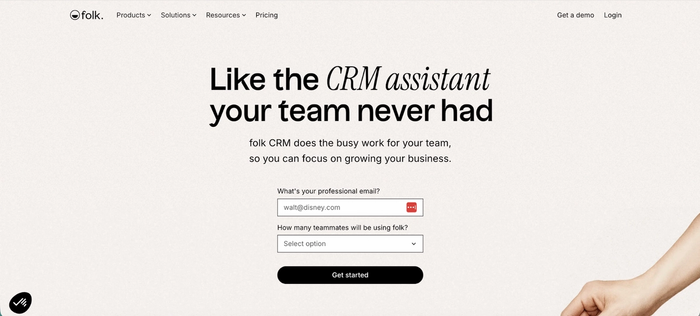
It keeps people's records alongside communication history and internal notes in a shared workspace that feels closer to a spreadsheet than a traditional CRM.
Folk is a low-cost CRM built for freelancers, founders, and small teams that handle relationships through email and LinkedIn. Typical use cases include partnerships, recruiting, community management, and early-stage sales, where staying organized matters more than forecasting or reporting.
Key features of Folk CRM
Folk CRM covers the basics really well, from contact management to keeping track of follow-ups and sales pipelines.
- Contact-centered records: Each contact has a single profile where you store background context, notes, and communication history. This is useful when managing relationships that do not follow a clear sales cycle, such as partners, candidates, or investors.
- Spreadsheet-style views: Contacts are displayed in table-based views that behave like a spreadsheet (Google Sheets or, as some users describe it, Airtable-like). You can add custom fields and filter lists to answer practical questions like who needs a follow-up or which contacts belong to a specific segment.
- Manual follow-up tracking: Follow-ups are handled through notes and reminders rather than complex rules. This gives flexibility for ad hoc outreach and personal relationship management.
- Email sync: When connected to Gmail or Outlook, email conversations appear on the contact record. You can easily review past discussions without switching tools.
- Lightweight email campaigns: Folk supports small-scale outreach, such as sending a short campaign to a selected group of contacts. It is suited to personal communication rather than high-volume sales activity.
- Team collaboration: Multiple users can work in the same workspace with shared visibility into contacts and notes. This helps teams avoid duplicate outreach and maintain consistent communication.
- Quick setup: You can import contacts, connect your email, and start using Folk in a short amount of time. There is very little configuration required to get value from the tool.
It doesn't have the depth of features that more complex CRMs do; instead, it does fewer things, and it does them well. The spreadsheet-like interface and smooth onboarding make Folk CRM easy to use and get started with.
Folk CRM: ease of use
For small teams and especially for businesses just getting their first CRM tool, ease of use is a major concern. This is where Folk CRM stands out, as users across social media platforms and review websites consistently praise how easy Folk is to set up.
Folk customers state that the tool has all the features a small team may need and no unnecessary extras to bloat the software. Once you sign up, connecting the different business platforms is a breeze:
"I loved the simple setup and easy integration. You install, connect your email and WhatsApp, and install the Chrome plugin for LinkedIn, and you are running. The learning curve is easy, and the value it brings to my business is huge." - G2 review
In particular, the LinkedIn Chrome extension gets plenty of praise. You simply add it to your Chrome browser, and as you're on someone's LinkedIn profile, you can extract their email addresses, phone numbers, job titles, and more.
"Folk is truly one of the easiest and most valuable tools I have encountered in my sales career. What makes it stand out? The 1-click LI integration seamlessly pulls in accurate data, which has significantly enhanced my outreach efforts. I can then sequence prospects directly within either the web or desktop app, making it feel as though I have a dedicated enrichment and sales prospecting partner working in the background to support my side hustles." - G2 review
In general, you'll have no trouble getting started with Folk, even without previous CRM experience.
But once you explore the features a bit, you'll notice a common pain point: the CRM integrations.
Folk CRM integrations
The heart of a good CRM is the ability to import data and connect it with other tools in your tech stack. Folk doesn't excel here, and even the LinkedIn Chrome extension, which usually works well, can have problems with synchronization.
"Integration with LinkedIn can be flaky sometimes - but that's to be expected with how hard LinkedIn is trying to block third-party players, especially smaller ones like Folk...
I'd love my LinkedIn DMs to be integrated and to enable some LinkedIn Automation (a la Dux Soup or Dripify)." - G2 review
You'll notice on their pricing page that Folk CRM supports over 5,000 integrations, which seems pretty impressive. After some research, you'll find that they natively integrate only with Gmail, Outlook, LinkedIn, and WhatsApp. All of the other 4,900+ integrations and third-party apps are through Zapier or Make.com.
This not only complicates integration but adds to your monthly CRM bill. As one user put it:
"Still a lack of native integrations with other tools, but the workaround is to use automation tools like Zapier or Make to make it happen. Still a young offering, so there are a few CRM basics that are only launching now, like Deals (but it's launching now)." - G2 review
Then there are the issues with email tools. If you want to connect Google or Microsoft mailboxes with Folk, expect a few hiccups. As one user states:
"Folk is an amazing CRM, it's not as fully featured for email marketing as some others and doesn't have functionality for things like landing pages, website activity tracking or rich HTML email campaigns...but to be fair, that's not the core offer. I'd like to see stronger integrations in those areas, but what it does do already is great." - G2 review
And another reviewer expressed their concerns:
"When emails are sent through Folk CRM, they do not automatically show as sent in email accounts such as Outlook. Also, the plugin is GREAT, but would be beneficial if the LinkedIn extension were integrated more into an iOS feature" - G2 review
Speaking of iOS, this is one of the bigger issues with Folk, whether you're a sales assistant in the trenches or a manager delegating tasks.
Mobile app capabilities
Having a CRM phone app is critical for teams that are in the field and need to e.g., look up past conversations on the go. Unfortunately for Folk, this is one of the most common user complaints.
Folk doesn't have a mobile app, and it's primarily built for a desktop experience. As these users state:
"But there are a few bits I'm worried about:
- only a one-way sync, so Outlook contacts are still a mess
- no iPhone app
- This is a personal thing, but I'd like a defined home screen that maybe includes upcoming tasks, etc
- Oh, the biggest. Seems to get expensive quite quickly" - Reddit review
"The main drawback I find with Folk is the absence of a mobile app. While this is understandable considering LinkedIn's user experience, I still wish there were a much more advanced version available." - G2 review
Folk CRM pricing: how much does Folk CRM cost?
Folk has a straightforward pricing structure. There are three plans available, and you can purchase them on a monthly or annual basis. There is no free plan.
The first two plans come with a free trial (for 14 days), while the most expensive plan only gives you the option of hopping on a demo call.
Here are the plans and the features they come with:
The Standard plan starts at $25/user/month
Best for: small businesses just getting started with their first CRM
At $20 per month for the starting plan, Folk CRM's entry price point is comparable to other tools in this industry. You get all the basic features to help you manage contacts and their interactions with your team.
Key features include:
- Pipeline management
- Email campaigns
- Contact enrichment (limited to 500 per month)
- AI assistants
- Magic fields (limited to 2,000 per month)
- LinkedIn extension
- Email, calendar & WhatsApp sync
- 5,000+ integrations
This plan allows small teams to handle deal management and gives them a taste of the AI features that Folk has to offer. If you take a good look at their pricing page, you'll notice that enrichment and Magic fields credits are shared within a team. If you need more credits, you'll have to upgrade to the Premium plan.
The Premium plan starts at $50/user/month
Best for: small-to-mid-sized sales teams that need better team/performance management features
Premium doubles your monthly cost but also comes with a sizeable feature upgrade. You'll get everything from Standard, plus:
- Custom objects & Deals
- Email sequences
- Advanced roles & permissions
- Dashboards
- API access
- More credits for enrichments, messages, account sync, and magic fields
- Full history of interactions
While Standard lets you create campaigns, Premium gives you a sequence builder so you can guide leads down the funnel based on the way they interact with your content. Advanced roles and permissions, coupled with dashboards, give you an overview of team performance.
Lastly, API access is a big plus if you want to build fully custom integrations and workflow automations.
For larger teams or those with more advanced needs, the Custom plan may be the best bet.
The Custom plan starts at $100/user/month
Best for: existing Folk users who want to remove all account limitations
Once again, the price per user is doubled, but this time, there are no additional features to justify the price bump. Instead, the Custom plan unlocks the limitations around enrichments, messages, magic fields, and more.
You also get custom billing and a dedicated point of contact in the Folk team.
At $100 per user per month, Custom is fairly expensive, and smaller teams may find it hard to justify the cost. Also, you could get a better deal by combining a capable CRM, such as Capsule, with a lead enrichment tool that gives you an equal number of monthly credits.
Top Folk CRM alternatives to consider in 2026
If Folk’s features are limited and the pricing doesn’t fit your sales stack tech budget, there are plenty of other options on the market.
Capsule CRM
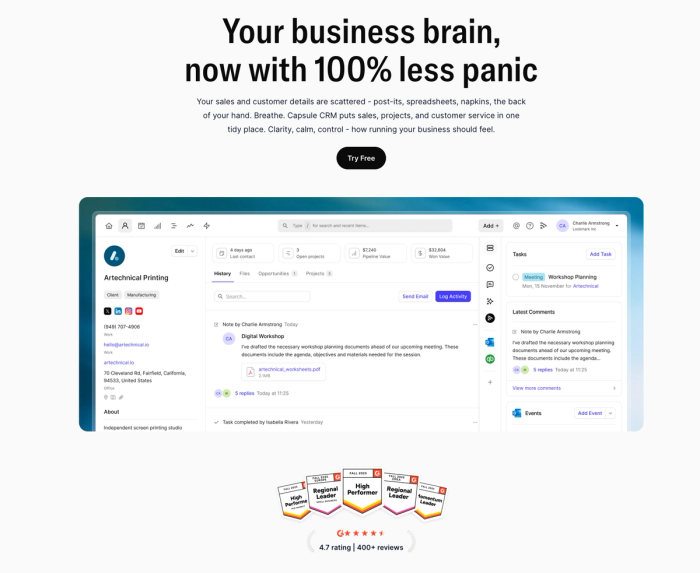
Best for small teams that want something simple now and flexible later. Capsule is easy to set up like Folk, but it does not box you in as your sales process grows. You get solid contact management, clear pipelines, a mobile app, and native integrations without needing Zapier for everything. It also offers a strong free plan and predictable pricing, which makes it a safer long-term choice than Folk.

Nimble
Best for relationship-driven teams that live in email and social networks. Nimble focuses heavily on contact enrichment and interaction history, especially across email and socials. It works well for consultants and partnership-focused roles, but it doesn’t have the clarity and structure of a traditional sales pipeline.
Attio
Best for teams that want deep customization and are willing to invest time upfront. Attio offers flexible data models and advanced workflows, but it comes with a steeper learning curve and fewer native integrations. Compared to Folk, it feels more powerful but also more demanding to maintain.
Pipedrive
Best for sales teams that need structure and visibility. Pipedrive focuses on deals and clear next steps, which makes it easier to manage a real sales process. It is less relationship-focused than Folk, but far better for forecasting, reporting, and scaling a sales team.
Should you get Folk CRM for your sales team?
If you want to create stronger relationships with customers and spreadsheets are no longer a viable option, Folk is an attractive choice, but it's not for everyone.
Consider using Folk CRM if…
- You are moving away from spreadsheets and want a simple way to manage contacts and conversations
- Your work revolves around relationships such as partnerships, recruiting, investors, or early-stage sales
- Your team mainly communicates through email, LinkedIn, or WhatsApp and wants that context visible on each contact
- You value quick onboarding and ease of use over advanced automation or reporting
- You run a small team and want shared visibility into contacts to avoid duplicate outreach
Don’t start with Folk CRM if…
- You need a mobile app to access contacts and activity while on the move
- Your sales process depends on advanced pipelines, forecasting, and detailed performance reporting
- You rely on many native integrations beyond email and LinkedIn
- You want to run high-volume email campaigns or complex sequences
- You expect long-term scalability without rising per-user costs tied to feature limits
In the end, Folk's biggest strength is also its biggest weakness.
If you're just getting into CRMs, it makes for a great short-term choice, with its ease of use and features that cover all the basics. But in the long term, you're doing yourself a disservice.
Folk doesn't handle some of the more advanced features as well as established CRM leaders, and if you do want them, you'll have to upgrade to more expensive plans. A year into using Folk CRM, you might find out that it's a good beginner CRM that you've outgrown. And at that point, switching to another tool is expensive and time-intensive.
If you want a CRM that is easy to start with, comes with a free plan, and affordable entry-level pricing but scales easily later on, you need Capsule. Both Folk and Capsule are easy to get started with, but Capsule allows you to grow at your own pace.
Find out why we're the #1 CRM choice of small businesses around the globe.