
Sales reps spend only about 30% of their week selling. The rest disappears into admin, meetings, and data entry. The last thing a solo founder or a small team needs is a sales tracker that adds an hour of busywork. This guide gives you a free sales tracker built for Google Sheets: paste in your deals, and the sheet does the rest, from pipeline value to a realistic forecast. We'll also cover the point where a spreadsheet hands off to a CRM.
What sales tracking does for a small team
Sales tracking is the process of recording every deal and moving it through your sales process, so you always know where revenue stands. At a large company, that's a full CRM job. For a solo or a team of three, a simple sales tracker does most of it for free.
The payoff is visibility. Deals stop living in your head and land in one view of the whole sales funnel: who's close and what to chase next. That view lets you monitor sales with no micromanaging, and act on real sales data where you used to act on a hunch. Sales tracking like this turns a vague sense of "things are fine" into numbers you can act on.
Think of it as light sales management for people who'd prefer to be selling. A solo consultant or a two-person agency doesn't need enterprise software, but both need to know which deals are real and which are wishful. A sales tracker draws that line. It's the smallest system that still gives you an honest answer to "how's the month looking?" That answer, available in seconds, is what separates running a business from reacting to it.
Questions a good sales tracker should answer
A good sales tracker answers these questions at a glance. Build it around them, and it stops being a list of names and starts being a sales engine.
1. What's in my pipeline right now?
The base number is the total value of every open deal. Your sales tracker lists one deal per row with its value and stage, and the summary tab sums it. This is your raw total, the ceiling on what could close. Watch it trend up or down week to week for an early read on the months ahead, the kind of real-time signal a notebook can't give you. A solo running 12 open deals worth $90,000 can read that number in a second – the same person guessing from memory is usually 20% off.
2. What's likely to close this month?
The raw total always reads high. Weight each deal by the probability of its stage and it drops to something realistic. A $10,000 deal at 40% counts as $4,000. The tracker does this in a weighted column, so you get a sober number for sales forecasting with no math on your part. Take the weighted figure into planning conversations; the raw total flatters you.
3. Where do deals stall?
Count your deals by stage and the bottleneck shows itself. Ten deals stuck at proposal and two at negotiation tell you exactly where the entire sales process jams, and a glance at how your stages are set up often reveals why. Fixing a stalled stage usually beats chasing new leads, because the work is already half done. The stage breakdown shows where your sales funnel is leaking, and which deals deserve your attention this week.
4. Am I winning enough?
Win rate is won deals divided by everything you closed, won or lost. It's the most honest measure of sales performance, and many solos never track it. The sales tracker logs closed deals and computes the rate, so a sales win pattern becomes visible and you can tie it back to various sales metrics. Track it for a quarter and patterns appear. Maybe you win a third of inbound deals but barely any cold ones, which tells you where to spend next month? A rising win rate confirms the approach, while a falling one is an early warning worth heeding.
5. Am I on track to my goal?
Set a monthly or quarterly target, and the summary shows won value against it as a percentage. That percentage reframes the month: 60% to goal with a week left is a different week than 95%. It turns sales goals from a poster into a daily steer and keeps you honest about sales progress, which is the whole point of tracking your sales in the first place. Check it daily in the last week of a period, and you'll spot which deals deserve a personal call to get over the line.
Choose your stages before ANYTHING else
Before you type a single deal, set your stages.


They're the backbone of the whole tracker, and they should mirror how you really sell. A simple set works for many teams: lead, qualified, proposal, negotiation, won, lost. A longer sales cycle might add a demo or trial step, while a transactional one might drop a step.
Each stage should mark a real change in buyer commitment, never an internal task, and every deal should only ever move forward or close. If you can't say what separates a "qualified" deal from a "lead", neither can anyone else on the team, and your stage counts turn to mush. Get the stages right and the rest of the tracker, the weighted forecast and the stall report included, falls into place on its own. If you sell more than one way, say projects and retainers, run each model in its own sheet. A tracker that blends models confuses every count it produces.
Working the tracker: a 10-minute weekly cadence
A sales tracker only works if it stays current.


This routine keeps it alive with almost no effort:
- After each sales call or meeting. Move the deal to its new stage and set the next step with a date. Two clicks, done, before you close the tab.
- Monday morning. Open the dashboard, scan the overdue next steps, and build your week around the deals closest to closing.
- End of the week. Mark any won or lost deals so your win rate stays accurate, and glance at the goal number to see where you stand.
Done this way, updating the tracker takes minutes and gives back hours by telling you where to spend them. The discipline to log a deal the moment it moves is the whole game. A tracker you update once a month lies to you, and a field sales rep running on memory loses deals that a 20-second update would have saved.
Mistakes that quietly break a sales tracker
The tool rarely fails. The habits around it do the damage, and these patterns kill trackers faster than any software limit:
- Optimistic stages. Marking a deal "negotiation" because you hope it is inflates every number downstream. Stage by evidence only.
- Stale rows. A deal you haven't touched in 30 days is usually dead. Trackers fill with these ghosts until the totals stop being believable.
- Tracking everything. The more columns you add, the less you update any of them. A lean tracker you maintain beats a rich one you abandon.
None of these need a better tool to fix. They need the discipline to keep the tracker honest, which is the same discipline a CRM later enforces for you. Each has the same cure: a habit. A sales tracker is only ever as good as the few minutes a day you give it.
When a spreadsheet stops keeping up
Use this traffic light check to see whether your sales tracker still fits the team.

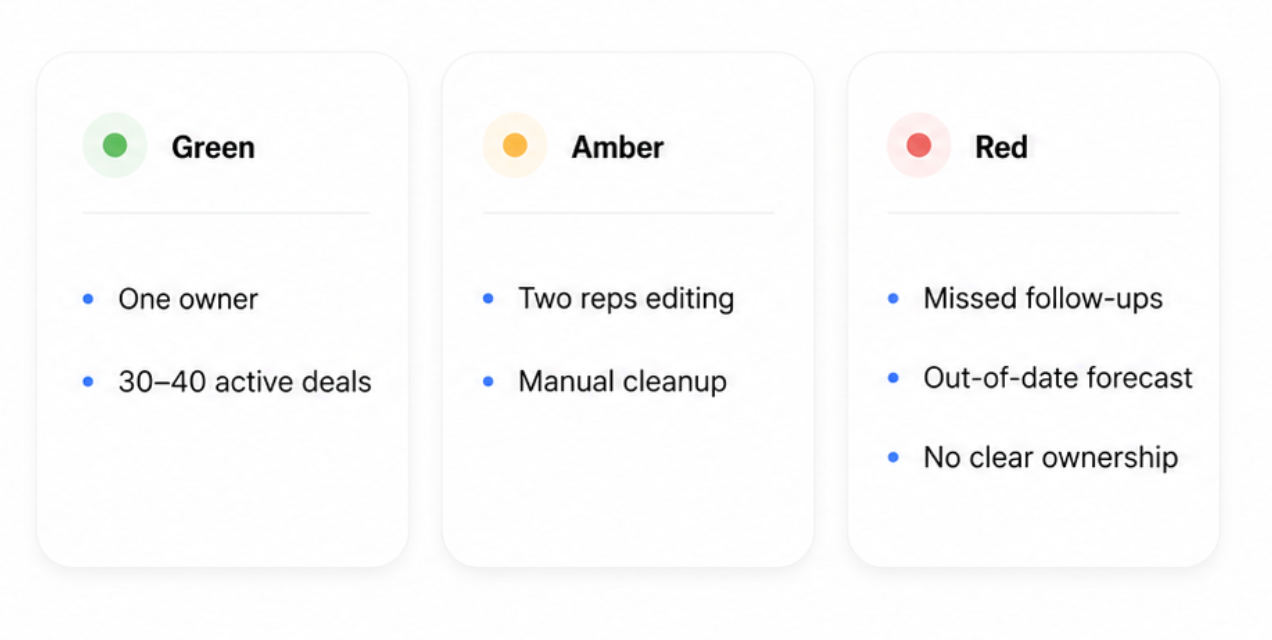
🟢 Green: the spreadsheet is doing its job
A spreadsheet works well when:
- One person owns and updates it.
- The team has fewer than 30–40 active deals.
- Follow-ups are still easy to remember.
- Reports take minutes, not hours.
- Everyone trusts the forecast.
At this stage, the sheet is simple, flexible, and quick to maintain.
🟠 Amber: the cracks are starting to show
Watch for signs like:
- Two reps editing the same file.
- Rows being overwritten or duplicated.
- Managers stitching together tabs for a team-wide view.
- Calls and emails living outside the tracker.
- More time spent updating the sheet than using it.
- Reports that require manual formulas and cleanup.
The spreadsheet may still work, but only with increasing care and effort.
🔴 Red: the tracker is costing you deals
It is time to consider a CRM when:
- Leads slip because follow-ups are missed.
- Nobody is sure who owns the next action.
- A report takes an afternoon to build.
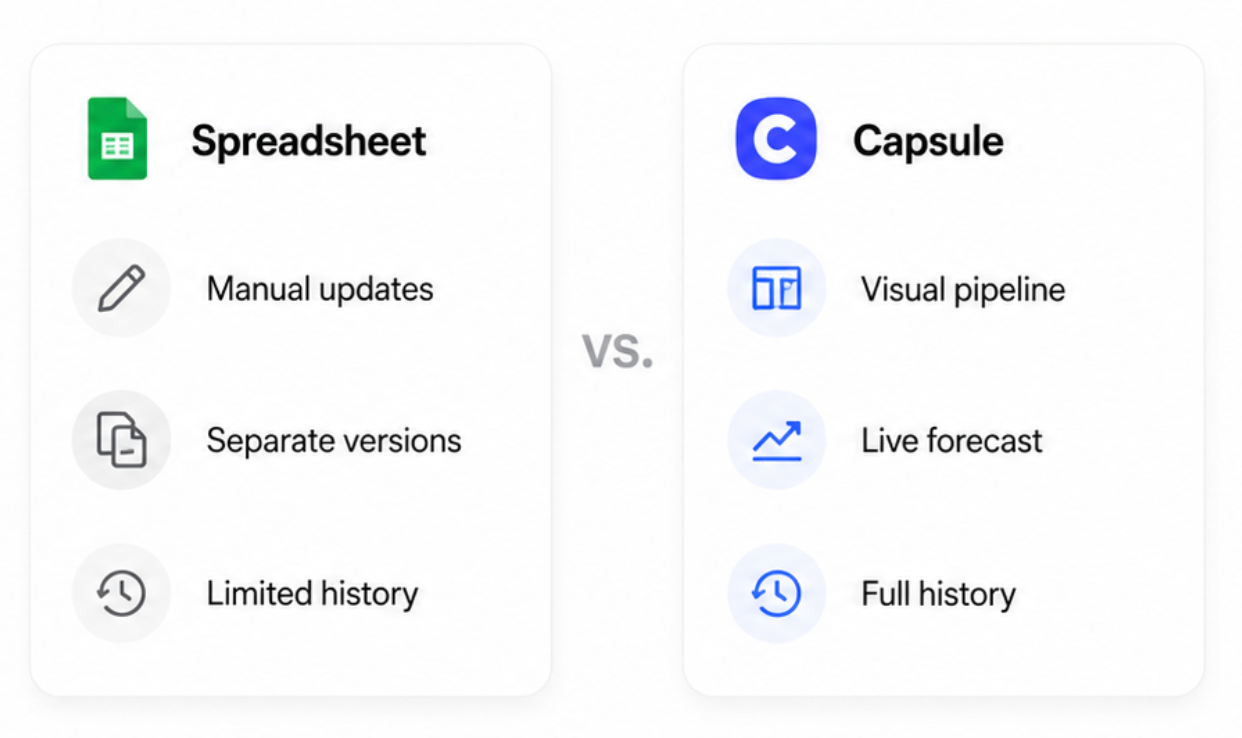
- The forecast is already out of date.
- Reps keep separate versions of the pipeline.
- The team cannot see the full history behind a deal.
- Manual upkeep is taking time away from selling.
Many small teams reach this point somewhere between two reps and 50 open deals. But the clearest warning is not the row count; it is the friction.
Moving up to a sales CRM, and where Capsule fits
A sales CRM is what you reach for when the spreadsheet starts asking for more attention than the deals inside it.
Capsule is built for exactly the solo-to-small-team jump.

Its visual pipeline replaces the manual Pipeline tab with drag-and-drop stages. Forecast reports handle the weighted calculations in the background, while built-in analytics show win rate, sales activity, and team performance without another spreadsheet to maintain.
The real gain is not just cleaner reporting. Calls, emails, notes, and next steps stay tied to the right customer and deal, so reps spend less time piecing together what happened and more time moving the opportunity forward. Workflow automation also takes repetitive admin off their desks; the work that quietly fills the week while selling gets squeezed into the gaps.

The switch is easy to test without committing the whole team. Capsule’s free plan includes two users and 250 contacts, giving a small team enough room to move over a working tracker. A 14-day trial opens up reporting and AI summaries for a fuller test.
Get the free sales tracker
Grab the free sales tracker here.
It's plug-and-play for Google Sheets or Excel, with the dashboard and stages already wired up, so free sales tracking starts the minute you paste in your deals. If a pipeline review calls for a hard copy on the table, printing the sheet cleanly takes a minute.
The number you should always be able to answer
A sales tracker pays off when it answers one question instantly: what do I do next to hit the number? Grab the template, run this week's deals through it – and when the sheet starts to creak, Capsule keeps the same view live for the whole team.